 Thailand
Starting May 1, 2025, all tourists entering Thailand must fill out the online Thailand Digital Arrival Card (TDAC) at https://tdac.immigration.go.th or THIM app. You no longer need to fill out a paper Arrival Card.
The electronic Thailand Digital Arrival Card (TDAC) is NOT a visa or an application for visa-free entry. It doesn't grant any permissions or change any entry requirements – it's just for keeping track of visitors to the country.
What you need to know before filling out the TDAC
- The form must be filled out for everyone, including children.
- Filling it out is free.
- It takes 5-10 minutes to complete the card.
- You need to fill it out no earlier than 3 days before your arrival. You simply can't fill it out earlier – the site won't let you select an earlier arrival date.
- It's better to use an email address with a .com domain or others, because confirmation emails might not arrive on .ru domains.
- A hotel booking is still not a mandatory requirement for entering Thailand. When filling out the form, you can just enter one of the hotels where you plan to stay.
- Have your passport details, flight details (from your itinerary receipt), hotel booking (at least your first one), or tour voucher with hotel info ready.
- The card is NOT a permit document (not a visa) – it's just an info card for record-keeping. Don't be afraid to fill it out or make a mistake: even if you mess up, you can fix it later using the edit button on the main page (you'll need to enter the card number), or just fill out a new form.
- There are no penalties for filling out a new form – you can freely submit a new one with your info. In fact, the site itself says that instead of correcting an error in your last or first name, you should fill out a new form.
- If you forget to fill out the card or realize you made mistakes at passport control, it's easy to fix on the spot by connecting to the airport Wi-Fi. We once filled out the card while standing in the passport control line.
- You can fill out the card separately for each tourist, or for a group or family. It doesn't matter – do whatever's easier for you.
- If you don't have a booked hotel or accommodation, you can enter the details of a hotel you haven't booked but plan to stay at – there are no strict rules requiring a confirmed and paid booking.
Important! Unfortunately, due to internet restrictions in Russia, the TDAC website might load poorly or not load at all. In that case, you'll need to use special technical means (we can't give instructions on bypassing restrictions due to legal requirements, but you can find the info yourself). Another option is to fill out the form after you arrive. You can connect to the free airport Wi-Fi, which is available at all international airports in Thailand.
| Form field | What to enter / where to get the info |
| Last name, first name (as in passport) | In Latin letters, exactly as in your passport (e.g., IVANOV, PETR). No abbreviations. |
| Date of birth | Listed in your passport (format DD/MM/YYYY). |
| Passport number | From the photo page. |
| Citizenship / Country of residence | Russia or another country (select from the dropdown list after typing the first letters). |
| City of residence | Your city in Latin letters. If it's not in the list, choose your region/area. |
| Occupation | In English: Manager, Engineer, Accountant, Freelancer, etc. Use a translator if needed. For children, you can put Student, Pupil. |
| Flight date and flight number | Found on your itinerary receipt (e-ticket) or tour documents. The flight number of your arrival flight to Thailand. |
| Departure country | Where your flight to Thailand departs from. If you have a connecting flight without leaving the transit zone – the country of your first flight. If you have a long stopover – the country of your last departure. |
| Hotel / resort province | Important nuance: If not listed in your documents, search online by the resort name. For example, for Pattaya – Chon Buri, for Phuket – Phuket, for Bangkok – Bangkok. |
| District / county (Amphoe / District) | Often listed in your hotel booking. If not, you can enter the beach name or main area (e.g., Patong, Karon, Bang Rak). |
| Hotel address (street, building number) | Copy it from your voucher or booking confirmation. The main thing is that the hotel can be identified. |
| Countries visited in the last 14 days | List all countries, including transit stops. |
| Email address (to receive the TDAC) | Better to use an international domain (.com, .net, .org). To a .ru address, the email might not arrive or could go to spam. |
Step-by-step guide to filling out the Thailand immigration card (with samples)
The guide is broken down into 5 steps. Each step includes screenshots – a ready-made sample of how to fill out the card. Follow along, and you'll fill out the TDAC without any mistakes in 5 minutes, even if you don't know English.
Step 1. Start page and language selection
1. Go to the website https://tdac.immigration.go.th/arrival-card/#/home. The official form can ONLY be filled out on this site – other sites might be scams. Also you can download and use jfficial THIM app
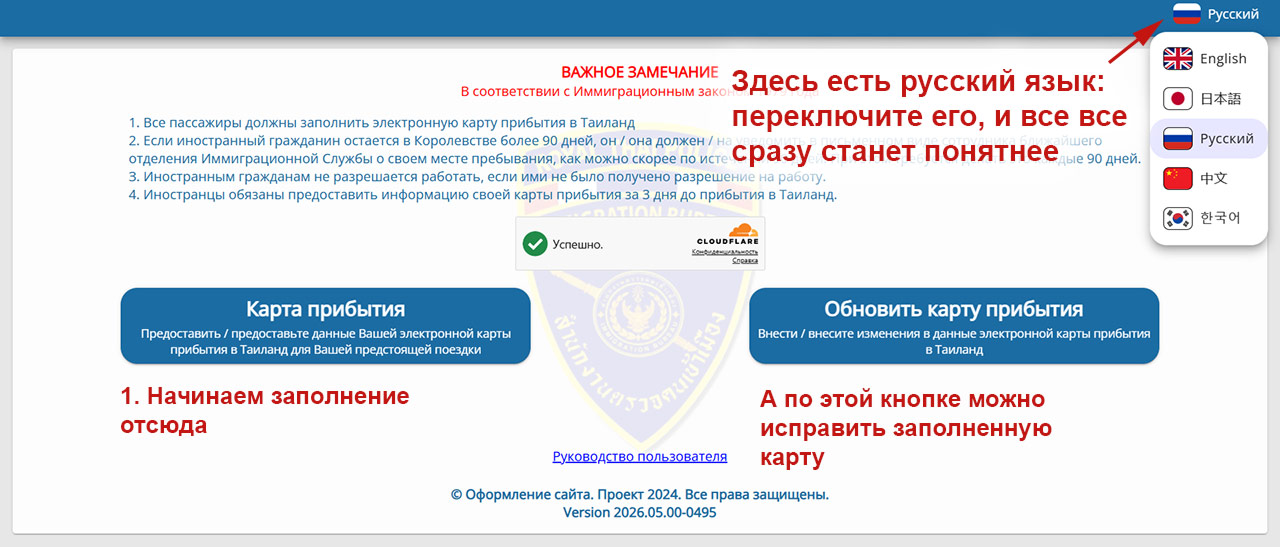
Honestly, we prefer to fill out the form in the English version, because the translation is more accurate and understandable, and for some reason the interface works faster. Nevertheless, the rest of the guide is presented in the Russian-language version for tourists who don't speak English.
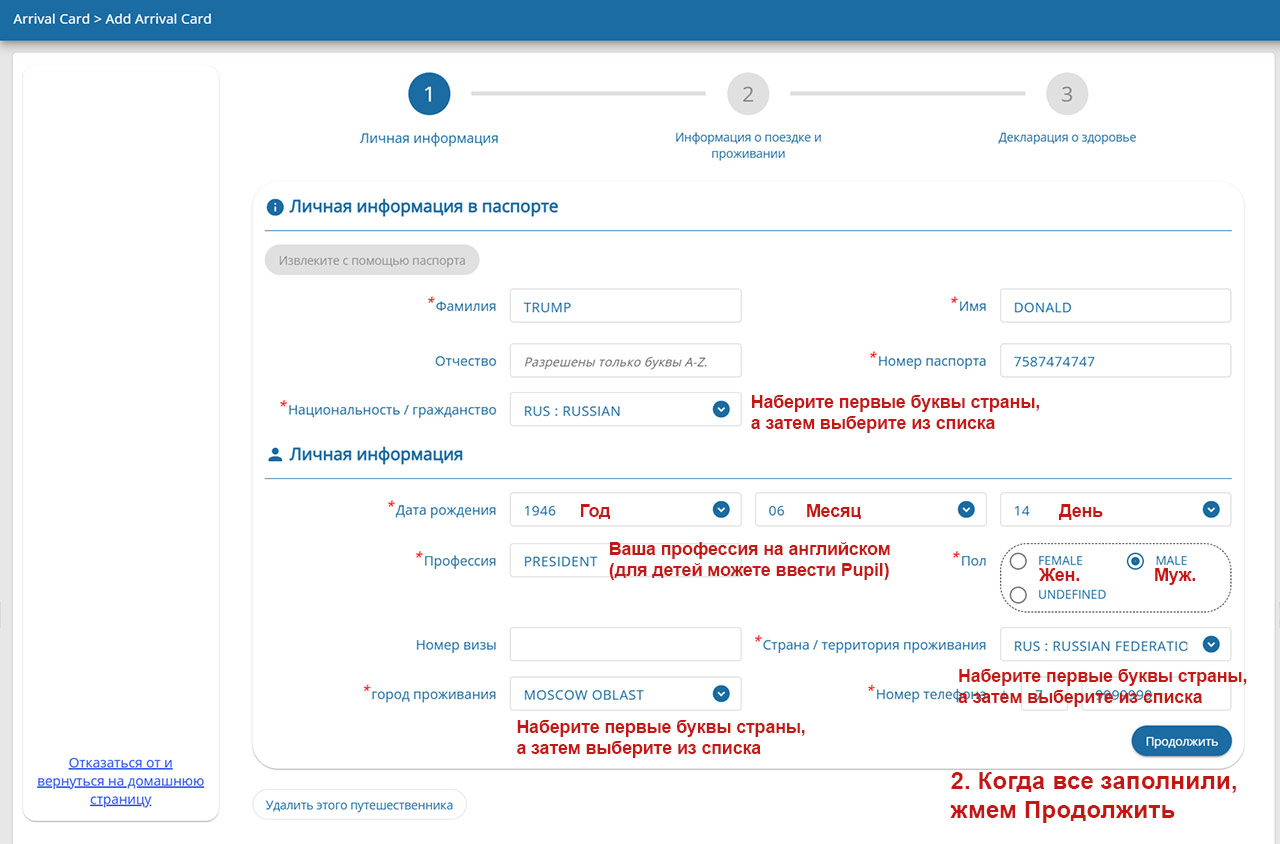
Step 2. Fill in your personal details
Everything must be filled out in Latin letters (English alphabet).
On this page, you'll also need to enter your occupation in English. If you don't know how your job is called in English, use a translator.
For the fields Country of residence, Citizenship, and City of residence, type the first letters of the country and wait a moment for a selection list to appear. If your City of residence is not in the list, enter your region.
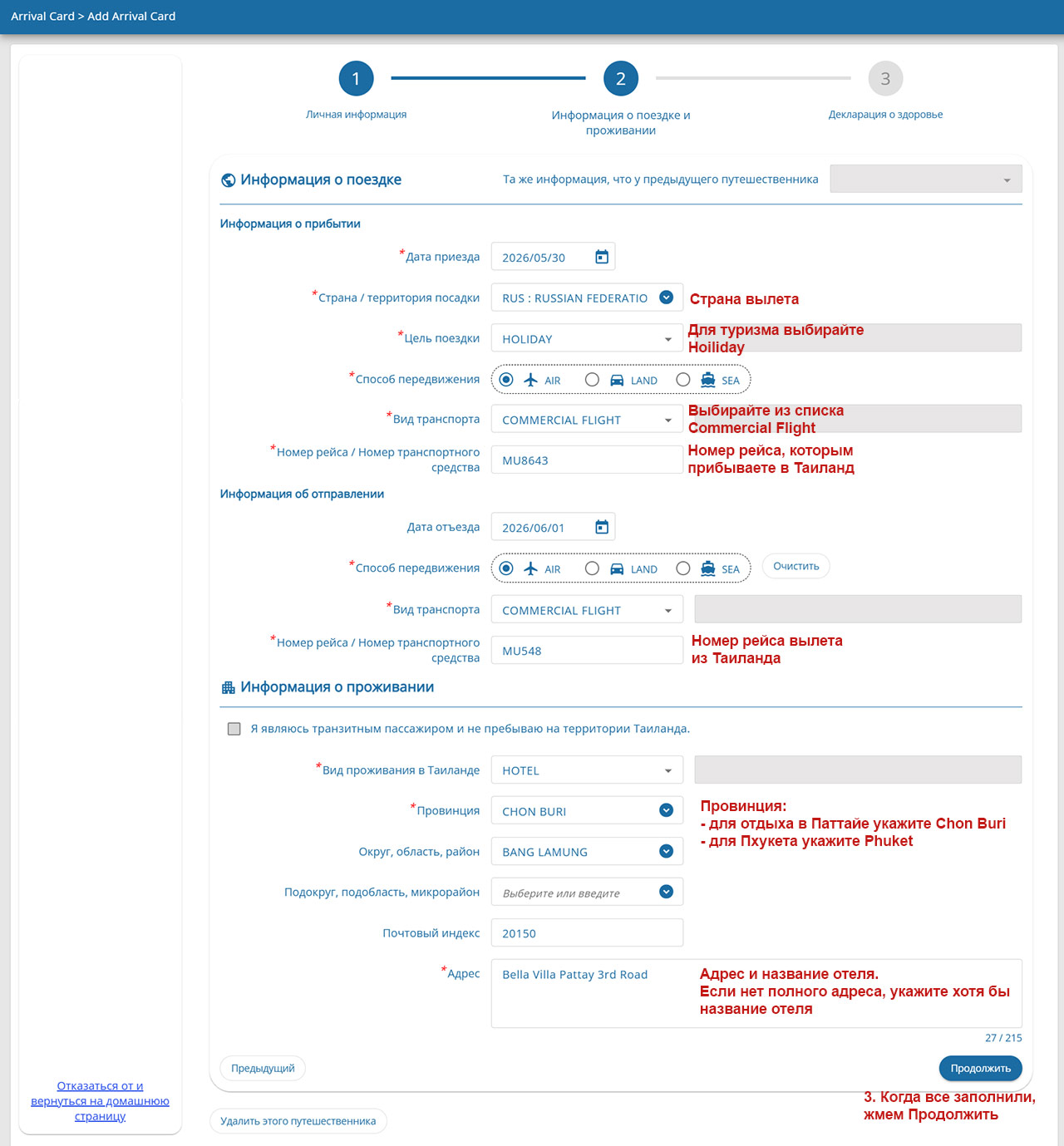
Step 3. Fill in your transport and stay information
At this stage, keep the following in mind:
- If you're flying with a connection through a third country without leaving the international transit area, enter Russia (or wherever you boarded your first flight) as the departure country. But if you're flying, say, through China with a several-day stopover, then you should enter China as the departure country.
- Enter the flight number of the flight you're arriving on in Thailand, not the one you departed on from your home country if you have a connecting flight.
- In the Accommodation Information section, it's best to enter the province, district, and address as accurately as possible. This info is in your tour operator vouchers or hotel booking. Important for Pattaya: enter the province Chon Buri.
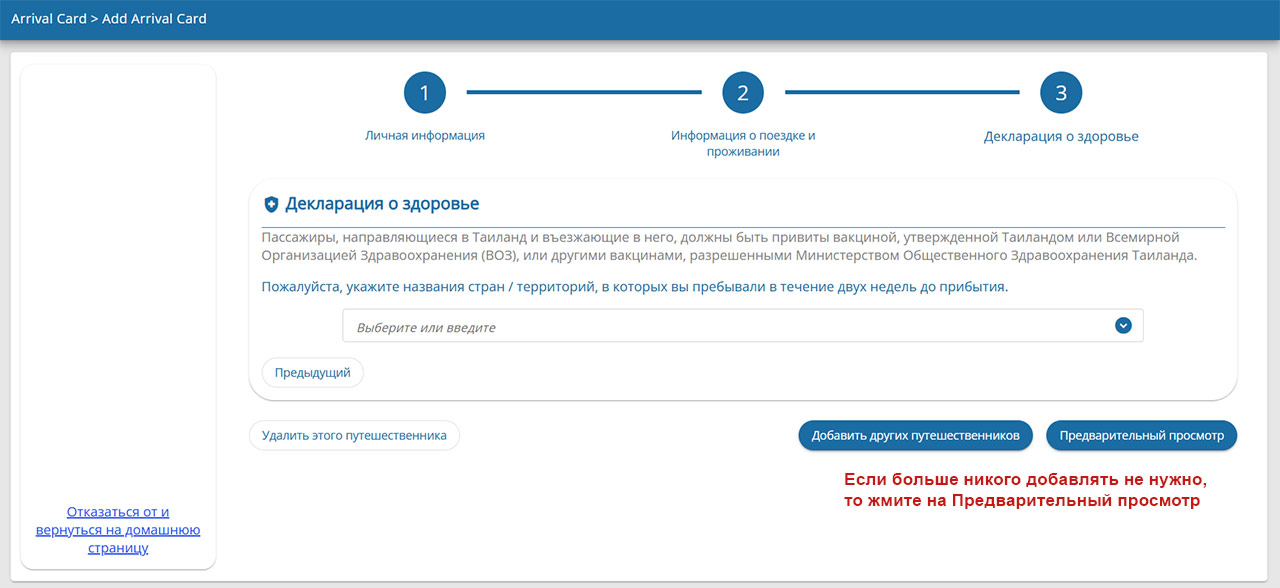
Step 4. Add more travelers or finish filling
On this screen, you need to add the countries you've visited in the last 14 days (including the country where you had a layover).
Then you can add more travelers if you're traveling with family or a group. But this is optional – you can fill out a separate form for each person.
If you don't need to add anyone else, click 'Preview'.
Step 5. Review your info
On the next (last) page, double-check all the information you've entered. If everything looks good, check the consent box at the bottom of the page, enter your email address (the completed form will be sent there), and click the Submit button.
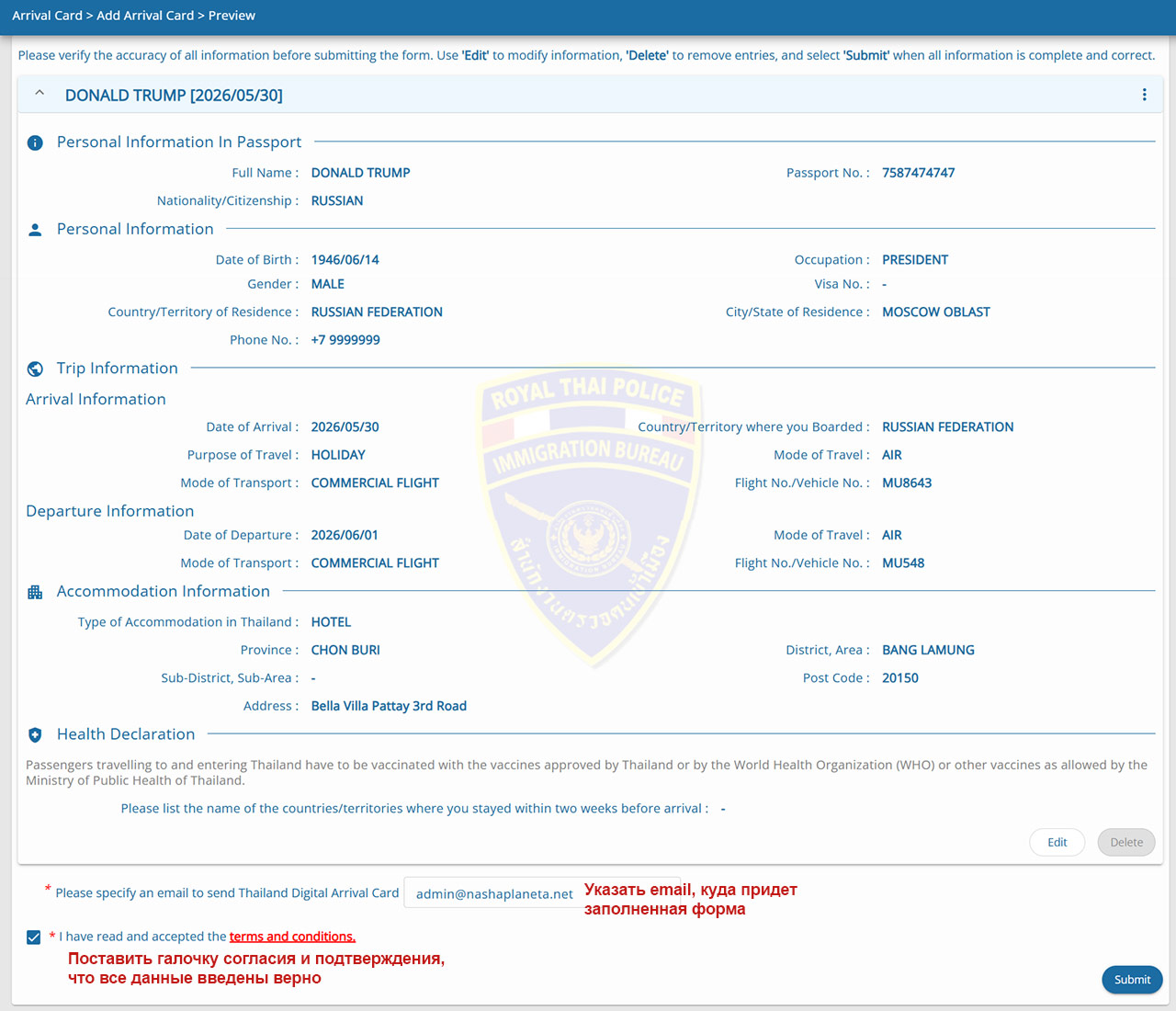
And that's it – your form is ready!
A PDF document with QR codes will be sent to your email almost immediately. You might be asked to show it at check-in for your flight and at passport control, so save it to your phone and make sure you have an app that can display PDF files.
If the email doesn't arrive, check your spam folder. If it's not there either, you can save the PDF form right away on the last page after submitting – there will be Download and Print buttons.
If you didn't receive the email and you've already closed the last page, just fill out the form again.